How to Automate Document Processing and Cut Operational Time by Up to 95% (Without Sacrificing Accuracy)

Document-heavy work has a way of quietly draining productivity. Invoices arrive in different layouts. Receipts are crumpled and faded. Contracts contain critical clauses buried in pages of text. IDs and forms come in inconsistent formats-scanned, photographed, emailed, exported.
Most teams solve this the same way: people “read and type.” It works-until volume increases, deadlines tighten, and manual data entry becomes the bottleneck (and the source of avoidable errors).
That’s where intelligent document processing (IDP) comes in. Solutions like Parser automate data extraction from unstructured and semi-structured documents using AI and OCR, converting messy inputs into clean, structured data that flows directly into business systems.
This article explains what automated document processing is, how it works in practice, and how organizations can reduce operational time by up to 95% by eliminating repetitive document handling.
What Is Automated Document Processing?
Automated document processing is the use of software-typically combining OCR (Optical Character Recognition) and AI-driven document understanding-to extract structured information from documents and deliver it in a usable format (such as JSON, CSV, database fields, or ERP-ready records).
Instead of manually entering fields like invoice numbers, totals, dates, vendor names, line items, and payment terms, an IDP tool reads the document, identifies relevant fields, and outputs standardized data automatically.
The core idea in one line
Automated document processing replaces “read + interpret + type” with “upload + extract + integrate.”
Why Manual Document Processing Slows Teams Down
Manual processing isn’t just slow-it’s operationally fragile. Common issues include:
- Time costs at scale: Even a “quick” 3–5 minutes per document becomes unmanageable at thousands of documents per month.
- Human error: Typos, missed fields, misread totals, and mismatched vendors introduce downstream reconciliation work.
- Inconsistent formats: The same data appears in different places across suppliers, departments, and regions.
- Delayed decisions: When data is stuck in PDFs or images, finance, operations, and analytics teams can’t act quickly.
If your organization relies on invoices, receipts, contracts, onboarding documents, shipping forms, or IDs, document automation often becomes one of the highest-ROI workflow upgrades available.
Introducing Parser: Intelligent Document Processing Built for Real-World Documents
Parser is an intelligent document processing solution designed to automate extraction of structured data from unstructured or semi-structured documents. Using advanced AI and OCR, it eliminates manual data entry, reduces human error, and increases operational efficiency-especially in high-volume workflows.
Key Features of Parser (And What They Mean in Practice)
1) Automated Data Extraction
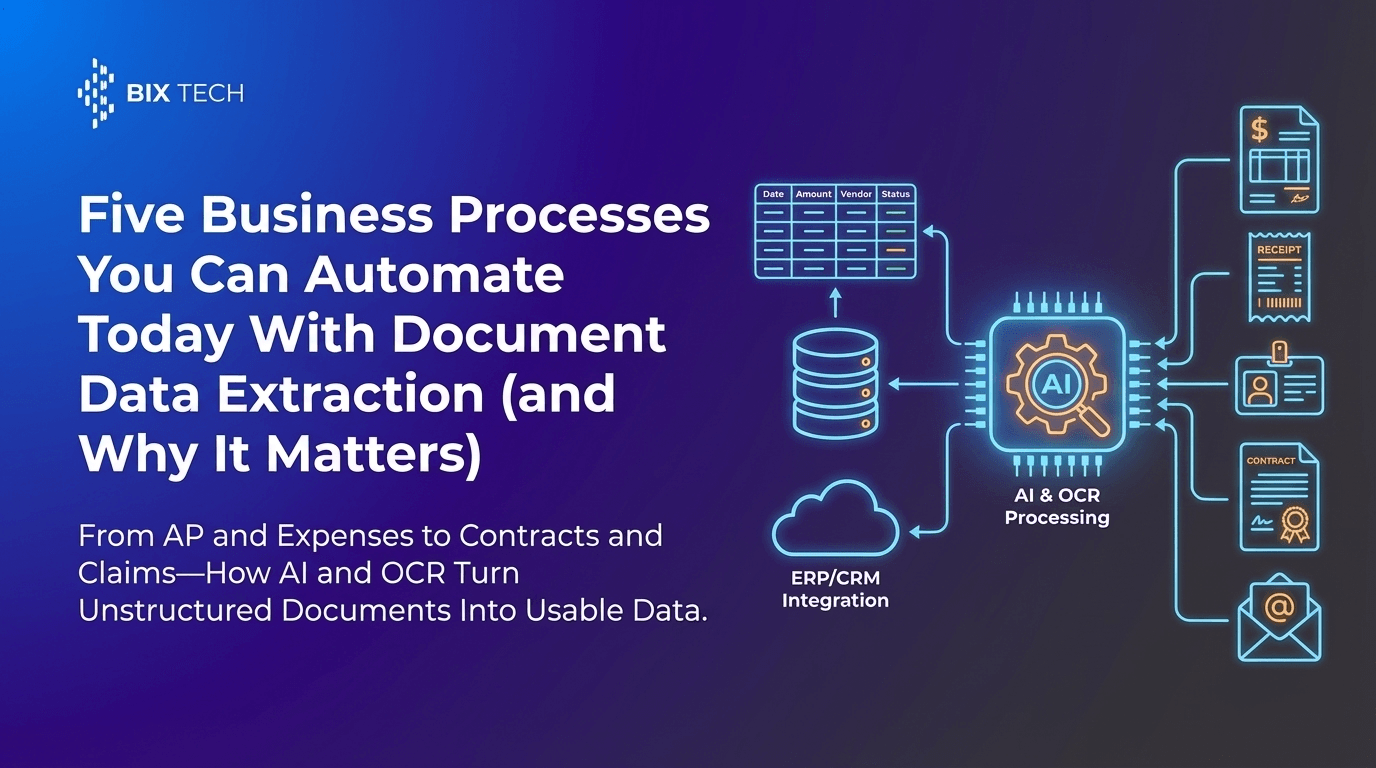
Parser converts documents like:
- Invoices and purchase orders
- Receipts and expense reports
- Contracts and agreements
- IDs and onboarding forms
…into actionable digital data.
Practical impact: Instead of copying totals, dates, addresses, tax IDs, or line items manually, teams receive consistent structured output ready for accounting, compliance, or analytics.
2) AI-Powered Accuracy (Not Just OCR)
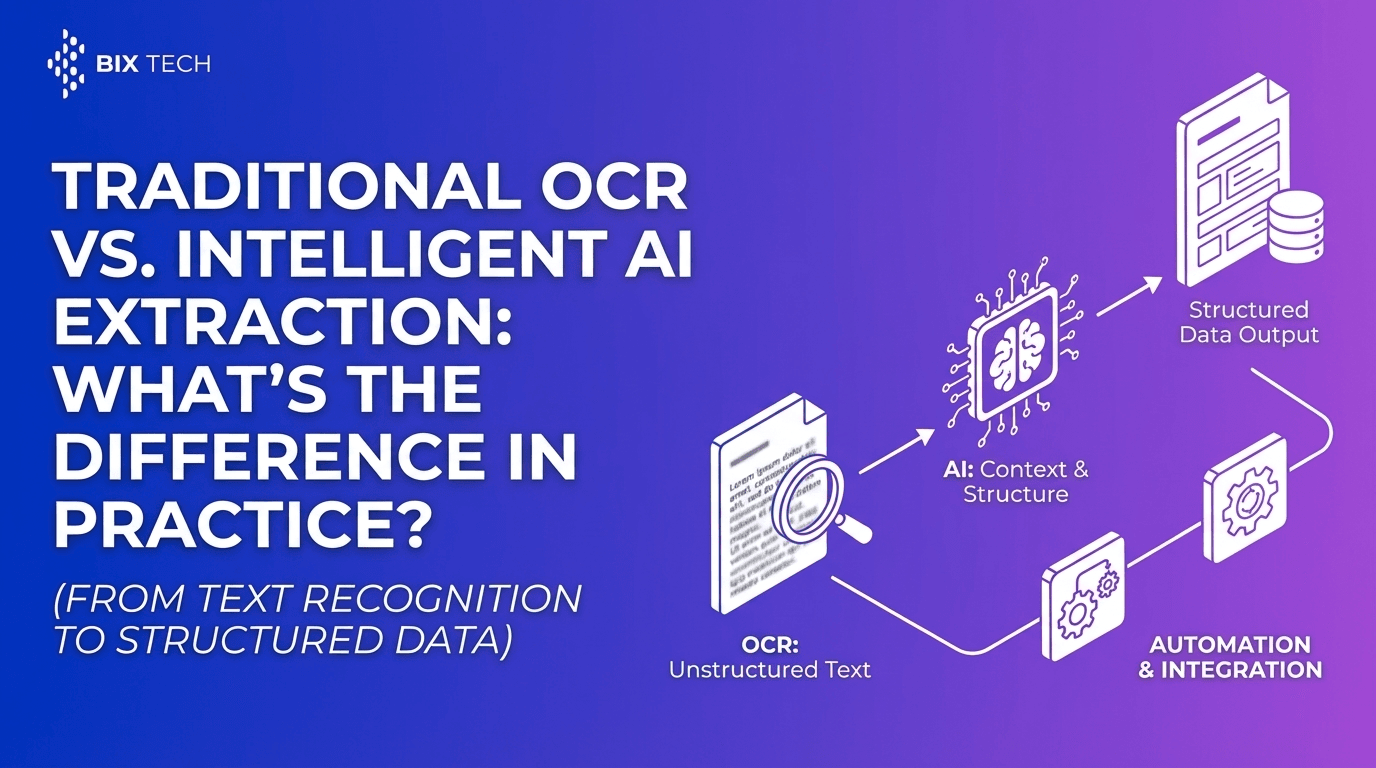
Basic OCR turns images into text. Parser goes further by using machine learning models to understand:
- Document structure and layout
- Field context (e.g., distinguishing “Total” vs. “Subtotal”)
- Variations across templates and vendors
Practical impact: Higher precision across diverse formats-especially when documents are messy, scanned, rotated, or inconsistent. For a deeper look at where modern workflows are headed, see OCR extraction in 2026 and how to automate document processing.
3) Customizable Workflows
Every business defines “important data” differently. Parser supports custom field extraction, so workflows can be tailored to:
- Finance (invoice number, PO reference, VAT, payment terms)
- HR (employee ID, address, start date fields from forms)
- Legal (key clauses, dates, parties, renewal terms)
- Logistics (BOL numbers, shipment dates, carrier details)
Practical impact: You extract exactly what you need-no bloated output, no manual reformatting.
4) Integration Ready
Parser is built to integrate with:
- ERPs and accounting platforms
- Databases and data warehouses
- BI tools and reporting pipelines
- Automation platforms and internal systems
Practical impact: Document processing becomes part of an end-to-end pipeline-documents in, structured data out, business systems updated automatically.
5) Scalable for High-Volume Processing
As document volume grows, manual processes usually require hiring and training more staff. Parser scales by processing documents rapidly and consistently.
Practical impact: Growth doesn’t have to mean proportional headcount increases-and operational throughput becomes predictable.
How Parser Delivers Up to 95% Time Savings
A “95% reduction” typically comes from removing the slowest parts of the workflow:
- Opening and reviewing documents
- Finding relevant fields
- Typing values into systems
- Correcting errors and reconciling mismatches
- Routing files to the right team members
With automation, the process shifts to:
- Upload/ingest → extract → validate exceptions → export/integrate
In other words, humans move from data entry to exception handling-reviewing only the small percentage of documents that need attention.
Common Use Cases for Intelligent Document Processing
Invoice Processing (AP Automation)
Goal: Extract header fields (vendor, invoice number, date, total, tax) and optionally line items.
Result: Faster invoice cycle times, fewer keying errors, easier matching to purchase orders.
Receipts and Expense Management
Goal: Capture merchant name, date, currency, subtotal, tax, tip, total.
Result: Faster reimbursements and improved compliance with spending policies.
Contract Data Extraction
Goal: Identify parties, effective dates, termination clauses, renewals, and obligations.
Result: Better visibility into risk, renewals, and compliance-without manual review of every page.
ID and Form Processing
Goal: Extract identity fields or form fields reliably across scans and photos.
Result: Faster onboarding, reduced administrative load, consistent records.
A Practical Framework for Implementing Document Automation
Step 1: Pick a High-Volume, High-Friction Workflow
Good starting points include invoices, receipts, or standardized forms-anywhere repetitive data entry dominates.
Step 2: Define the “Minimum Valuable Fields”
Avoid boiling the ocean. Start with the fields that unlock immediate value (e.g., invoice number, total, due date, vendor).
Step 3: Build a Validation Layer for Exceptions
Automation is strongest when paired with a simple review step for low-confidence cases, unusual formats, or missing fields.
Step 4: Integrate with the Systems You Already Use
The biggest efficiency gains come when extracted data flows into ERPs, databases, and BI tools automatically-reducing copy/paste work to near zero.
Step 5: Measure Outcomes That Matter
Track metrics such as:
- Average handling time per document
- Straight-through processing rate
- Error rate and rework time
- Cost per document processed
- Time-to-approval (for AP/expenses)
SEO Quick Answer: What Is Intelligent Document Processing (IDP)?
Intelligent Document Processing (IDP) is a technology that uses OCR and AI to automatically extract, classify, and structure data from documents like invoices, receipts, contracts, and forms-reducing manual data entry and improving speed and accuracy.
SEO Quick Answer: How Does OCR Automation Reduce Operational Time?
OCR automation reduces operational time by converting documents into machine-readable text and, when combined with AI field extraction, automatically populating business systems. This minimizes manual typing, decreases error-driven rework, and speeds up approvals and reporting. To understand the practical differences between approaches, compare traditional OCR vs intelligent AI extraction.
Value Proposition: From Document-Heavy Work to Agile Digital Workflows
Parser transforms document-heavy processes into agile digital workflows. By automating the repetitive “read and type” task, teams can redirect time toward higher-value work like analysis, exception management, compliance checks, and process improvement.
The real advantage isn’t just faster processing-it’s more reliable data, lower processing costs, and better operational visibility, delivered through structured, integration-ready outputs.
Frequently Asked Questions (Featured Snippet–Friendly)
Can Parser extract data from different invoice layouts and formats?
Yes. Parser uses AI-powered document understanding to handle diverse layouts and formats, extracting fields based on context rather than relying on a single fixed template.
What types of documents can be automated?
Common documents include invoices, receipts, contracts, IDs, and business forms-especially those that arrive as PDFs, scans, or photos.
Do automated extraction workflows still need human review?
Often only for exceptions. Most modern IDP workflows are designed for “straight-through processing” on standard documents, with human validation reserved for low-confidence or unusual cases.
What’s the biggest benefit of document automation?
The biggest benefit is reducing manual data entry and rework, which can cut operational handling time dramatically-often approaching up to 95% in mature, well-integrated workflows.
Final Takeaway
Automating document processing isn’t just a productivity upgrade-it’s a foundational shift toward cleaner data pipelines and scalable operations. With an intelligent document processing solution like Parser, organizations can convert invoices, receipts, contracts, and IDs into structured data automatically, integrate it into core systems, and reclaim countless hours previously lost to repetitive administrative tasks. To see the platform in action, follow the guide on how to use Parser for document extraction workflows.