How to Integrate Automatic Document Extraction into Your System via API (A Practical Guide for Technical Teams)

Automatic document extraction has moved from “nice to have” to mission-critical for teams dealing with invoices, receipts, contracts, IDs, and other document-heavy workflows. When the volume of paperwork grows, the traditional “read and type” process becomes a bottleneck-slow, expensive, and prone to human error.
This guide explains how to integrate an intelligent document processing (IDP) solution-Parser-into your system via API. It’s written for technical teams who want a clean, scalable approach to extracting structured data from unstructured or semi-structured documents, and then pushing that data into ERPs, databases, and analytics tools.
What Is Parser (and What Problem Does It Solve)?
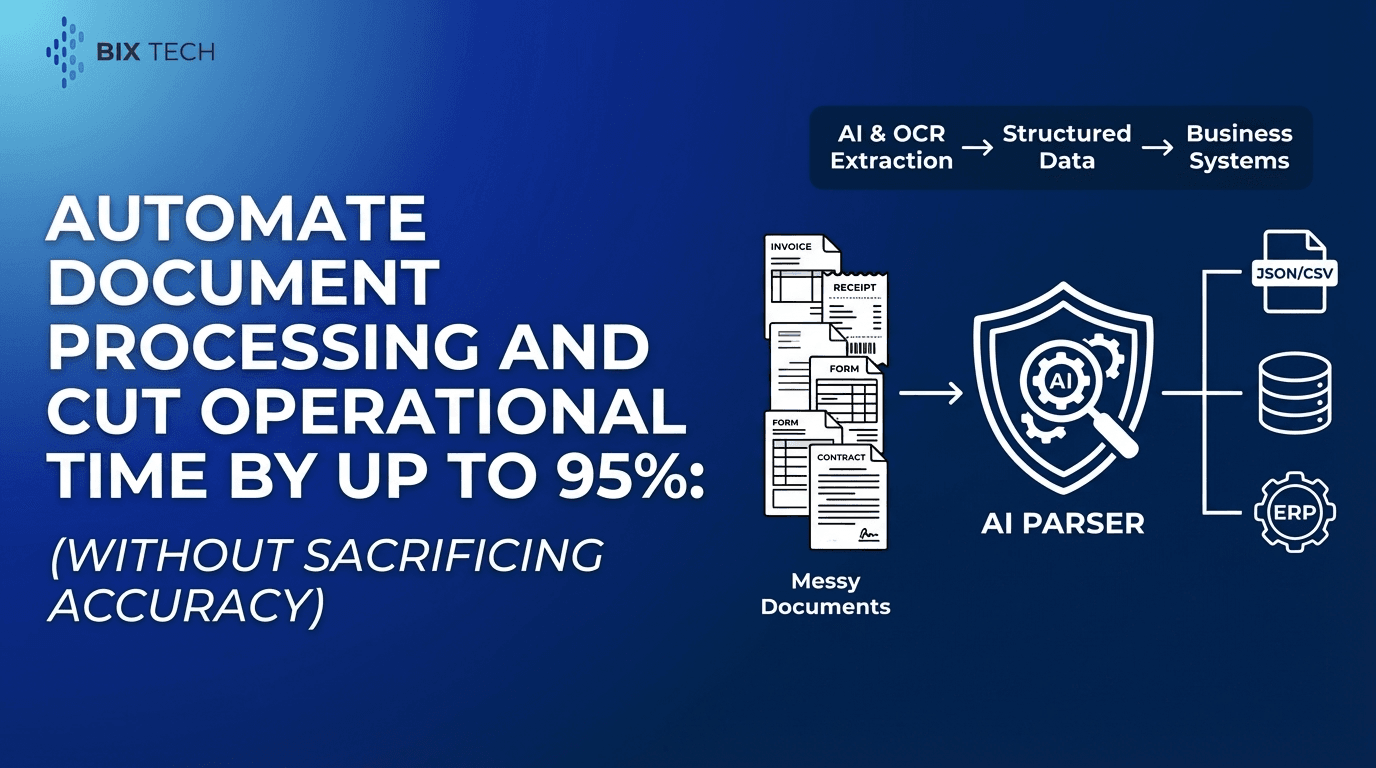
Parser is an intelligent document processing solution designed to automate the extraction of structured data from unstructured or semi-structured documents. Using advanced AI and OCR (Optical Character Recognition), Parser converts document content into reliable, machine-readable data-without requiring manual data entry.
Why this matters
Manual transcription creates two persistent problems:
- Operational drag: People become the throughput limit.
- Data quality risk: Small errors cascade into downstream systems (accounting, compliance, reporting, customer experience).
Parser addresses both by turning documents into consistent digital outputs-fast and at scale.
Common Use Cases for Automatic Document Extraction
Automatic document extraction via API is especially valuable when documents arrive continuously and must be processed quickly.
High-impact examples
- Accounts payable automation (invoices, purchase orders, remittances)
- Expense management (receipts, reimbursement forms)
- Contract analytics (key clauses, dates, parties, terms)
- KYC/identity verification (IDs, proof of address)
- Logistics and supply chain (bills of lading, packing slips)
- Customer onboarding (applications, supporting documentation)
In each case, the goal is the same: convert messy real-world inputs (PDFs, scans, photos, emails) into clean structured records.
Key Features of Parser (Mapped to Real Integration Needs)
1) Automated Data Extraction
Parser can convert documents like invoices, receipts, contracts, and IDs into actionable digital data-without hardcoding templates for every layout.
Typical extracted fields
- Invoice number, dates, supplier name
- Line items, quantities, totals, taxes
- Contract parties, start/end dates, renewal terms
- ID fields (name, DOB, ID number), depending on document type
2) AI-Powered Accuracy
Parser uses machine learning models to understand document layout and context. This matters because real documents vary-vendors change invoice formats, scans come in skewed, and PDFs may be image-only. For a deeper look at modern extraction approaches, see traditional OCR vs intelligent AI extraction.
3) Customizable Workflows
Instead of forcing your system to accept a one-size-fits-all output, Parser supports field-level customization. Technical teams can define:
- Which fields are required vs optional
- Data types (string, date, number, currency)
- Validation rules (e.g., totals must equal sum of lines)
4) Integration Ready
Parser is built to integrate with existing systems-ERPs, databases, and business intelligence tools-so extracted data can flow directly into operational pipelines.
5) Scalability
Parser supports high-volume document processing, enabling teams to move from “we can handle 200 invoices per week” to “we can handle 20,000+ per week,” without linear headcount growth.
API Integration Overview: The Core Flow
Most API-based document extraction integrations follow a simple, repeatable pattern:
- Ingest: Your system receives a document (PDF/image).
- Upload: You send the file to Parser via API.
- Process: Parser runs OCR + AI extraction.
- Retrieve results: Your system pulls structured output (JSON).
- Validate & enrich: Apply business rules, master data matching, and exception handling.
- Write back: Store results or sync into ERP/DB/BI.
- Monitor: Track quality, latency, and failures.
This approach keeps your architecture modular: documents in, structured data out.
Reference Architecture: A Production-Ready Design
A robust integration typically includes the following components:
Document intake layer
- Email ingestion (AP inbox)
- Upload portal
- SFTP drop
- App upload (mobile receipts)
- EDI/PDF ingestion
Processing orchestration
- Queue-based job management (for throughput and retries)
- Idempotency controls (avoid duplicate processing)
- Correlation IDs for traceability
Extraction service (Parser)
- File upload endpoint
- Processing endpoint (sync or async)
- Results endpoint (JSON output, confidence scores if available)
Post-processing layer
- Field validation (dates, totals, tax, currency)
- Normalization (supplier names, address formats)
- Master data lookups (vendor IDs, GL codes)
- Approval workflows for exceptions
Downstream systems
- ERP posting
- Data warehouse ingestion
- BI dashboards
- Audit/compliance storage
Step-by-Step: How to Integrate Parser via API
1) Define your extraction requirements (before you write code)
Start by documenting what “done” means:
- Which document types are in scope (invoices, receipts, contracts, IDs)
- Required fields per document type
- Output format expectations (JSON schema)
- Expected error handling (missing fields, low confidence, unreadable scans)
- SLAs (processing time, daily volume)
This prevents the most common integration failure: building around outputs that don’t match business needs.
2) Standardize file handling and preprocessing
Even the best OCR benefits from clean inputs. Consider:
- Acceptable file types (PDF, JPG, PNG, TIFF)
- Max file size limits
- Multi-page documents handling
- Orientation correction (rotate if needed)
- De-skew and cropping (especially for photos)
A simple preprocessing step can drastically reduce extraction noise and improve downstream validation success.
3) Authenticate and secure the integration
Typical best practices include:
- Store API keys/tokens in a secrets manager (not in code)
- Use least-privilege credentials
- Encrypt documents in transit (TLS) and at rest (storage encryption)
- Apply retention policies to raw uploads and extracted results
- Log access for auditability (especially for IDs and contracts)
If documents include personal data, privacy-by-design is non-negotiable. Review Parser’s approach to document processing data security.
4) Upload documents and start extraction
In most systems, the document upload triggers a processing job:
- Your API call sends the file (or a secure file URL)
- Parser returns a job ID (recommended for async workflows)
- Your system tracks job status until results are ready
Tip for scale: Prefer asynchronous extraction with job polling or webhooks, especially during peak volume windows.
5) Retrieve structured results (JSON) and validate
Once processing completes, your system pulls extracted fields. A production workflow typically includes:
- Schema validation (type checks, required fields)
- Business rule validation
- totals = subtotal + tax
- invoice date within acceptable range
- currency codes valid
- Duplicate detection
- supplier + invoice number + amount + date matching
When validation fails, route the document to an exception workflow rather than letting bad data hit the ERP.
6) Map fields to your ERP/database schema
Extraction output is rarely identical to internal schemas. Create a mapping layer that:
- Transforms names (e.g.,
invoice_total→gross_amount) - Converts formats (dates, decimals, locale-specific separators)
- Adds derived fields (net terms days, tax rate)
- Attaches metadata (document ID, processing timestamp)
This mapping layer is also where teams implement versioning so changes don’t break downstream systems.
7) Close the loop with monitoring and continuous improvement
A well-run extraction pipeline is observable:
- Processing latency (p50/p95)
- Error rates by document type/supplier
- % documents requiring manual review
- Top failing fields (e.g., PO number missing)
- Retries and timeouts
With these metrics, teams can identify where to improve templates/models, preprocessing, or upstream document quality.
Custom Workflows: Turning Extraction into an End-to-End Pipeline
Parser supports customizable workflows, which is where automation becomes truly valuable. Common workflow patterns include:
AP invoice workflow
- Extract supplier, invoice number, totals, tax, line items
- Match supplier to vendor master
- 2-way/3-way match against PO/GRN
- Auto-code GL where confidence is high
- Route exceptions to AP review
- Post to ERP
Contract workflow
- Extract parties, term dates, renewal clauses, governing law
- Normalize clause labels into internal taxonomy
- Trigger alerts for renewals or non-standard terms
- Store structured contract metadata in a repository
Integration Patterns That Scale (Without Creating a Maintenance Nightmare)
Asynchronous jobs (recommended)
Best for high volume and longer processing times:
- Submit document → receive job ID → poll or receive webhook → retrieve results
Webhooks for event-driven systems
Useful when you want near real-time orchestration without constant polling.
Batch processing for backfills
Ideal when migrating legacy archives or processing historical invoices/contracts.
Human-in-the-loop for exceptions
Automation is strongest when it includes a graceful manual path:
- Only route edge cases for review
- Capture corrections to improve future performance
Practical Tips to Improve OCR and Extraction Quality
Even with AI-powered extraction, quality depends on inputs and rules. A few practical improvements make a big difference:
- Prefer digital PDFs over scans when available (text layer improves reliability)
- Encourage clear photo capture for receipts (avoid glare, shadows, folds)
- Normalize supplier names using master data matching
- Add validation to catch common mistakes (e.g., swapped subtotal/total)
- Store confidence scores (when available) to drive exception thresholds
The goal is not “100% automation from day one,” but a stable pipeline that increases straight-through processing over time. For more implementation ideas, see how to automate document processing and cut operational time by up to 95%.
Value Proposition: What Parser Delivers to Technical Teams and the Business
Parser transforms document-heavy processes into agile digital workflows. By automating the “read and type” task, teams can focus on analysis and exception handling rather than repetitive administration.
Business outcomes typically seen with automatic document extraction
- Faster cycle times from document receipt to system entry
- Lower processing cost per document
- Improved data reliability and audit readiness
- Better scalability without proportional headcount growth
For technical teams, the win is equally clear: a cleaner data pipeline, fewer ad-hoc scripts, and an integration pattern that can expand across departments.
Featured Snippet FAQs (Clear, Structured Answers)
What is automatic document extraction?
Automatic document extraction is the process of using OCR and AI to convert information from documents (PDFs, scans, images) into structured data (usually JSON) that software systems can store, validate, and use.
What types of documents can Parser extract data from?
Parser can extract structured data from common business documents such as invoices, receipts, contracts, and identification documents, even when formats vary between sources.
How does API-based document extraction work?
Your system uploads a document to an extraction API, the service processes it using OCR and AI models, and then returns structured results (e.g., JSON) that your system maps into databases, ERPs, or analytics tools.
What’s the biggest integration challenge with document extraction?
The most common challenge is not uploading files-it’s ensuring the extracted results match internal schemas and business rules. A strong mapping/validation layer and an exception workflow are key to production stability.
Final Thoughts: Building a Reliable Extraction Pipeline (Not Just a Demo)
Integrating automatic document extraction via API is one of the fastest ways to modernize document-heavy operations. With Parser, teams get automated extraction, AI-powered accuracy, customizable workflows, integration readiness, and scalability-packaged in a way that fits real systems, not just prototypes.
The strongest implementations treat extraction as a pipeline: ingest, extract, validate, enrich, integrate, and monitor. Done well, it becomes a durable foundation for faster operations, better data, and automation that scales.